

If your firm recently completed a migration from Worldox to NetDocuments, the first time you launch Practice Master or Tabs3 on a workstation that previously had Worldox installed, you’ll see a pop-up warning that the Worldox integration has been disabled because it cannot detect Worldox running on the computer.
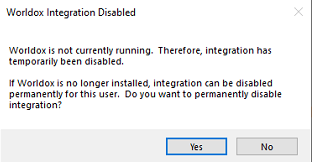
Click Yes to permanently disable the integration. Once you do, you’ll never see the message again on that machine. If you click No, the warning will reappear every time the application launches until someone clicks Yes.
This prompt will appear on each workstation the first time the application is launched after the migration, and each user must click Yes individually. Unfortunately, there is currently no way to script or push this setting out automatically — it must be handled manually on each machine.
To avoid confusion, consider sending your staff a quick heads-up before go-live so they know exactly what to click when they see it.