

Hint: It’s Not a NetDocuments Problem
If you’ve ever pulled a document into an Outlook email using ndAttach and then clicked Edit → Convert to PDF only to have the conversion fail, you’re not alone.
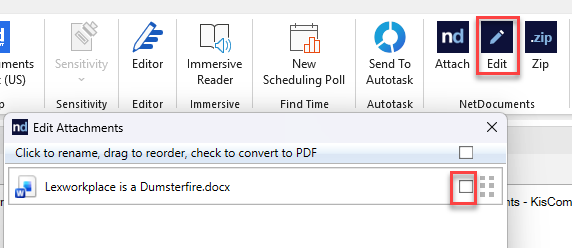
This is one of the more confusing issues we see at law firms, because everything looks like a NetDocuments function — you’re clicking a NetDocuments button, after all. But the culprit is actually Microsoft Office.
Here’s what’s really going on.
NetDocuments Doesn’t Have a PDF Engine
When you use ndAttach to grab a document from NetDocuments and then choose to convert it to PDF, NetDocuments essentially hands off the conversion to Microsoft Office. Office is the application doing the heavy lifting of rendering and converting the document to PDF format. NetDocuments doesn’t have its own PDF conversion engine — it relies entirely on what Microsoft has installed and running on your machine.
So when the conversion fails, the instinct is to blame NetDocuments. But the real issue is that something has gone wrong with the Microsoft Office installation itself — a corrupted component, a failed update, or a damaged file that Office needs to perform that conversion.
The Fix: A Full Detect and Repair on Microsoft Office
The good news is that this is a straightforward fix. You don’t need to reinstall NetDocuments or reconfigure anything on the document management side. What you need is for your IT department to run a Detect and Repair on Microsoft Office.
Here’s what that process looks like:
Step 1: Close all Microsoft Office applications (Outlook, Word, Excel, etc.)
Step 2: Open the Control Panel and navigate to Programs → Programs and Features
Step 3: Find Microsoft Office in the list, right-click it, and select Change
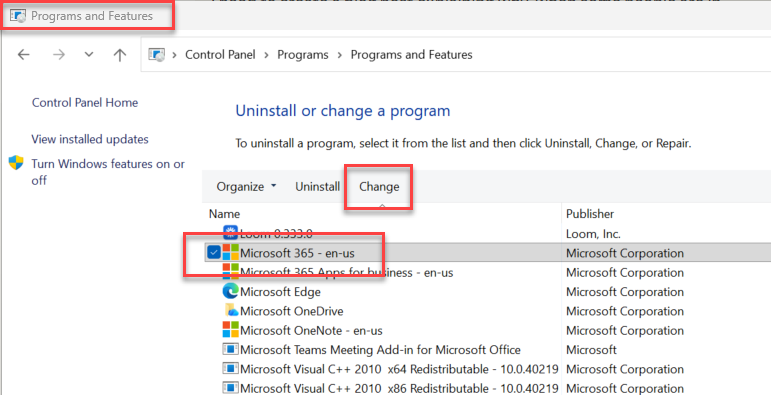
Step 4: Choose Online Repair and let it run to completion

Step 5: Restart the machine and test the PDF conversion again
In most cases, the Online Repair resolves the issue completely. After the repair, Office’s PDF conversion components are restored to a healthy state, and the ndAttach workflow picks right back up where it left off.
Why Does This Happen?
Microsoft Office updates roll out frequently, and occasionally an update can corrupt or remove a component that other parts of Office depend on. PDF conversion is one of the more complex functions Office performs, and it’s one of the first things to break when an installation gets into a bad state. It can happen on a perfectly well-maintained machine — it’s not necessarily a sign that something is wrong with your IT setup.
Bottom Line
If PDF conversion is failing through ndAttach in Outlook, don’t spend time uninstalling and reinstalling NetDocuments or opening a ticket with NetDocuments support. Go straight to your IT team and ask them to run a full repair on Microsoft Office. Nine times out of ten, that’s all it takes.
Have questions about NetDocuments or running into other issues with your implementation? Reach out to us at Optiable — we’re happy to help.