

NetDocuments Search is Giving Me the Wrong Results

Posted in NetDocuments Searching, NetDocuments Tips on April 22, 2025 by Craig Bayer

When do the following search:
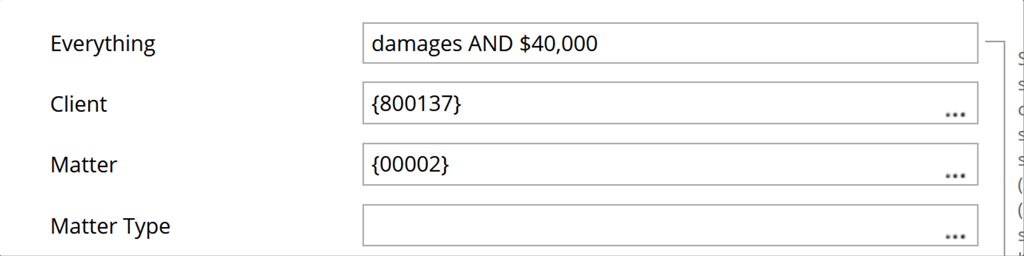
image

I am getting results for documents that don’t have $40,000 in them. 

The Solution is to change the search to 

damages AND “$40,000”

This would get you the correct results. 

Nerd Alert, but this is do to something called Tokenized.  See below from NetDocuments:


“When searching long strings with both letters and numbers, you may notice that you get a rather large number of results if you do not place the term in double quotes. This is because these strings of letters and numbers are being what is called Tokenized. Tokenization is a behavior that breaks up strings of characters into elements called tokens. We specifically tokenize based on capitalization, whitespace, and characters swapping between letters and numbers.”


See:  https://support.netdocuments.com/s/article/206958336

About the Author

Craig Bayer is the founder and leader of Optiable, an award-winning document management (DMS) consulting firm dedicated to helping law firms seamlessly integrate NetDocuments. Specializing in firms with 10 to 150 users, he has successfully guided over 500 law firms across the United States and Canada through NetDocuments implementations since 2010.

With deep expertise in the legal industry, Craig has a proven track record of optimizing technology to meet the unique needs of law firms. His certifications include industry-leading tools such as Amicus Attorney, Centerbase, Clio, PCLaw, HotDocs, TimeMatters, Soluno, and Worldox, enabling him to deliver comprehensive solutions tailored to each client’s workflow and goals.

Craig Bayer