

One Step Save has to be installed on every computer that needs it — buying the subscription doesn’t put it on anyone’s desktop. Here’s how to install One Step Save on a single workstation.
This post covers installation only. Configuring which applications One Step Save hooks into is a separate job, and I’ll cover it in a follow-up post.
What Is One Step Save?
One Step Save is a third-party program that adds NetDocuments save and open integration to programs NetDocuments doesn’t support on its own. Most firms buy it for WordPerfect — there’s no ndSave button in WordPerfect and never has been — but it also covers non-Adobe PDF editors, QuickBooks, Tabs3, PCLaw, Notepad, CSV editors, and printing a web page to PDF. If you haven’t purchased it yet, start here: How to Add NetDocuments WordPerfect Integration with One Step Save.
Before You Start
Two things have to be true before you run the installer:
- ndOffice is already installed on the workstation. One Step Save works alongside ndOffice, not instead of it. Install ndOffice, sign in, confirm it works in Word, and then come back to this. Install them in the wrong order and you’ll be uninstalling and starting over.
- You have admin rights on the computer. You can’t install this as a standard user.
The Install
Step 1: Confirm ndOffice Is Installed and Signed In
Open Word and check that the NetDocuments tab is on the ribbon and that ndSave works. If it doesn’t, stop here and fix ndOffice first.
Step 2: Close WordPerfect and Any Office Applications
The installer is putting hooks into these programs, so they need to be closed before you start.
Step 3: Download the Installer
Download the installer here: onestepsave-setup.msi
Because it’s an MSI, IT can also deploy it via Group Policy or an RMM tool instead of walking to every desk.
Step 4: Run the Installer
Right-click onestepsave-setup.msi and run it as an administrator.
Step 5: Open WordPerfect and Test It
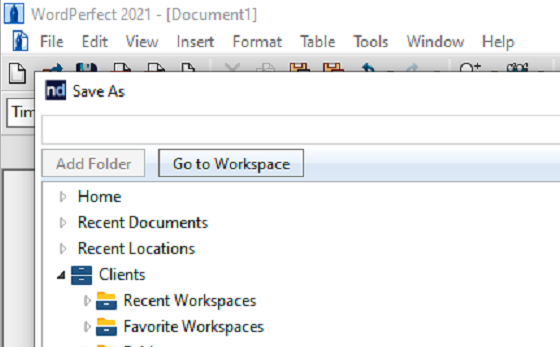
Click File → Save As. You should get the NetDocuments save dialog instead of the Windows one. That’s how you know it took.
Step 1: In OneStepSave Admin, configure target applications to integrate with NetDocuments (usually, we do this)
Need Help?
Rolling One Step Save out to a whole firm and don’t want to touch every machine by hand? We deploy it as part of our NetDocuments installs and can handle the configuration side too.
Schedule a free consultation at go.oncehub.com/optconsult
Optiable has completed over 550 NetDocuments implementations since 2010, specializing in law firms with 10 to 150 users.