

The NetDocuments AI Assistant is transforming how law firms interact with their document management system. As more firms adopt this powerful tool, we’re hearing common questions about its capabilities, limitations, and best practices. Here are the answers to the most frequently asked questions about the AI Assistant.
Understanding AI Assistant Capabilities
Does the AI Assistant Hallucinate?
When using chatbots like ChatGPT, you input queries, and the chatbot drafts responses based on probability from all of the text contained within the LLM. Because NetDocuments AI Assistant is an agent that uses selected documents to ground the query response, in tandem with the LLM’s language capabilities, hallucinations or “made-up” answers are virtually nonexistent. The AI Assistant retrieves answers from documents, rather than a chatbot that retrieves them directly from the LLM, which is designed to function like a helpful intern.
What LLM is NetDocuments utilizing for the Assistant?
Currently, ndMAX utilizes the Microsoft Azure OpenAI as its LLM. Specifically, the AI Assistant is using GPT-5 in the US (Vault), DE, and EU/UK regions. GPT-4.1 is currently used in the AU region.
Because of NetDocuments’ close partnership with Microsoft, NetDocuments has access to the latest models as they are released. NetDocuments requested and was granted an additional layer of security for their customers and their clients, ensuring that Microsoft’s sensitive content moderators will not have access to data generated by AI Assistant/PatternBuilder MAX/ndMAX queries.
The NetDocuments platform has been architected to be LLM model agnostic – meaning that it is flexible enough to change LLM providers in the future based on technological advancements, new customer needs, and business demands.
Does OpenAI power the AI Assistant, or is the AI Infrastructure proprietary to NetDocuments?
While the AI Assistant uses Microsoft’s Azure OpenAI as its LLM, the Assistant’s infrastructure and capabilities were built by NetDocuments and will improve over time as NetDocuments adds additional tools.
Can the AI Assistant understand context from multiple documents?
Yes, the AI Assistant can analyze and synthesize information across all selected documents (up to 100). This makes it particularly useful for tasks like comparing contract versions, identifying themes across depositions, or summarizing information from multiple discovery documents.
Document Selection and Formats
Is there a limit to the number of documents that can be selected to use with the AI Assistant?
Yes, currently up to 100 documents can be selected, but that number will likely increase over time.
Is there a limit to the length of individual documents that can be used with the AI Assistant?
Currently, Azure OpenAI’s Assistant API has a 1 million-character per-document limit, which is roughly 900 pages, double-spaced. The file size limit is 512 MB per file (set by OpenAI).
Can the AI Assistant read all formats of documents (Word, Excel, PPT, etc.)?
The file formats the AI Assistant can search are: .c, .cpp, .cs, .doc, .docx, .html, .java, .json, .md, .pdf, .php, .pptx, .py, .tex, .ts, and .txt.
PowerPoint files must be in .pptx format. Any .ppt files will need to be upgraded to the new format.
Excel spreadsheets (.xlsx/.xls) are partially supported. The Assistant can extract the text, but the context of the formatted row and column structure is not preserved.
Can the AI Assistant be used with email messages or attachments?
The AI Assistant can be used with email messages. It uses full-text indexing to analyze the content of emails stored in NetDocuments. However, attachments within email messages are not included. For the AI Assistant to use attachments, they must be saved as separate documents in NetDocuments.
Is it possible to run the AI Assistant against multiple versions of a document?
Currently, the AI Assistant can only run on the official version of the selected files.
What happens if I select documents in different languages?
The AI Assistant can process documents in multiple languages, though performance is optimized for English. When working with multilingual documents, you may want to specify in your prompt which language you’d like the response in.
Usage and Limitations
Is there a limit to the number of questions I can ask?
No, there is no limit to the number of questions you can ask the AI Assistant.
Does the chat retain memory of previous conversations?
Yes, the AI Assistant retains a list of prior conversation threads that can be returned to for additional conversations within 30 days.
How long is the chat history with the AI Assistant available?
AI Assistant chats that haven’t been used for 30 days will be automatically deleted, but will be accessible at any time before that. As soon as you interact with the chat, the 30-day deletion timer is reset.
Can I share AI Assistant conversations with colleagues?
While you can share the outputs from AI Assistant conversations, the conversation threads themselves are currently user-specific. If you need to collaborate, consider copying relevant responses into a shared document or workspace.
Can you remove Ask AI from the Power Bar?
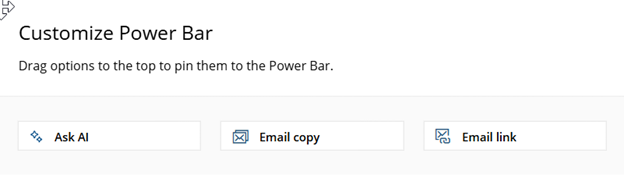
No, but it adds an extra Power Bar Button, so nothing is lost. Normal Power is 5 Items, with the AI Assistant its still 5 plus the AI Assistant.
What are the token limits for the NetDocuments AI Assistant?
The NetDocuments AI Assistant operates with token limits that govern how much content you can process within a given timeframe. Tokens are the basic units AI systems use to process text—small chunks of words and characters that the AI reads and analyzes. Every interaction consumes tokens, including your questions, the documents you’re analyzing, the AI’s responses, and your conversation history. If you exceed the token limit, you’ll need to wait approximately 6 hours before you can use the AI Assistant again. To avoid hitting this limit, be strategic with your document selection by choosing only relevant files rather than your entire workspace, keep your questions focused and specific, and consider starting new conversation threads when moving to different topics. If you’re conducting extensive document review projects, such as due diligence, plan your work in manageable sessions rather than analyzing everything at once. By managing your token usage thoughtfully, you can maintain productivity and make the most of the AI Assistant throughout your workday.
Prompt Library and Customization
Is the Prompt Library specific to the Firm or the User?
The Prompt Library is for the individual user.
Can I create custom prompts for recurring tasks?
Yes, the Prompt Library allows you to save frequently used prompts for easy reuse. This is particularly valuable for standardized tasks like contract review checklists, deposition summaries, or due diligence questionnaires.
Ready to Get Started with NetDocuments AI Assistant?
If you’re interested in implementing or optimizing the NetDocuments AI Assistant for your firm, contact Optiable. As NetDocuments specialists with over 540 implementations completed, we can help you:
- Configure AI Assistant for your firm’s specific workflows
- Train your team on best practices and effective prompt engineering
- Develop custom prompt libraries for your practice areas
- Integrate an AI Assistant into your existing document management processes
- Optimize your NetDocuments environment for maximum AI Assistant performance
The AI Assistant represents a significant advancement in legal technology, offering powerful capabilities to enhance productivity while maintaining the security and reliability that law firms require. With proper implementation and training, it can transform how your firm interacts with documents and information.
About Optiable: Optiable is a specialized NetDocuments consulting firm that has completed over 540 NetDocuments implementations across the United States and Canada. We help law firms maximize their NetDocuments investment through expert implementation, migration, training, and optimization services.
Contact Optiable today to learn how we can help your firm leverage the full power of NetDocuments AI Assistant.