

If you’re managing large-scale document migrations or regularly uploading batches of files to NetDocuments, you’ll want to know about Advanced Mode in ndOffice’s Folder Import Tool. This powerful feature, introduced in ndOffice 4.1, allows you to run multiple folder imports simultaneously, dramatically improving efficiency and workflow management.
What is Advanced Mode?
Advanced Mode in ndOffice enables users to queue and process multiple folder-import batches simultaneously. Instead of waiting for one import to complete before starting another, you can initiate multiple imports in succession, allowing the system to handle them concurrently. This is a game-changer for firms handling substantial document uploads or migration projects.
What Does Advanced Mode Do?
The primary benefit of Advanced Mode is the ability to process multiple batches simultaneously. Here’s what it enables:
- Queue multiple imports: Start your first import, then immediately begin setting up additional imports without waiting
- Time savings: Particularly valuable when handling large-scale uploads or migrating documents from multiple sources
- Improved workflow: Stay organized by managing multiple import batches in a single session
- Better resource utilization: Maximize your upload capacity by running concurrent imports
Whether you’re handling a handful of files or managing enterprise-level document migrations, Advanced Mode streamlines the entire process.
How to Enable Advanced Mode
The good news is that Advanced Mode is built into ndOffice 4.1 and later versions—there’s no special activation required. However, you may want to configure some optional settings to enhance functionality.
Step 1: Update to ndOffice 4.1 or Later
If you’re not already on ndOffice 4.1 or a newer version, you’ll need to update first. Visit the NetDocuments support portal or contact your IT administrator to obtain the latest version.
Step 2: Configure Optional Registry Settings (Optional but Recommended)
Administrators can add a registry key to allow the import of empty folders and folder structures, which is helpful in maintaining organizational hierarchy:
- Open Registry Editor (press Windows + R, type
regedit, and press Enter) - Navigate to:
Computer\HKEY_LOCAL_MACHINE\SOFTWARE\NetVoyage\NetDocuments - Create a new DWORD value named:
DocumentImportAllowEmptyFolders - Set the value to:
True
Important: Modifying the Windows Registry should only be performed by IT administrators or users comfortable with system-level changes.
How to Use Advanced Mode for Multiple Imports
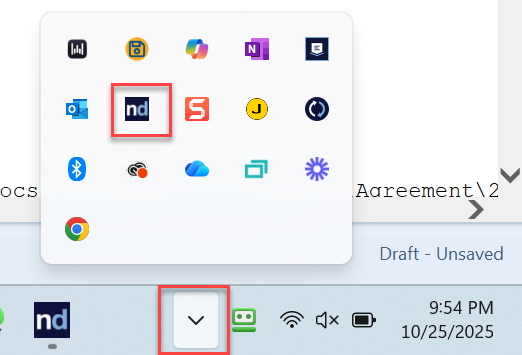
Step 1: Open up ndOffice
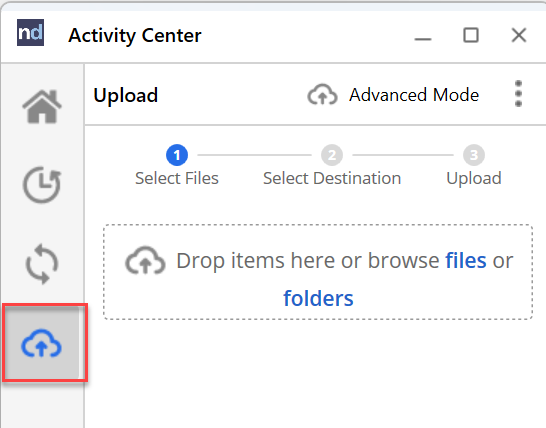
Step 2: Click on the Upload Button
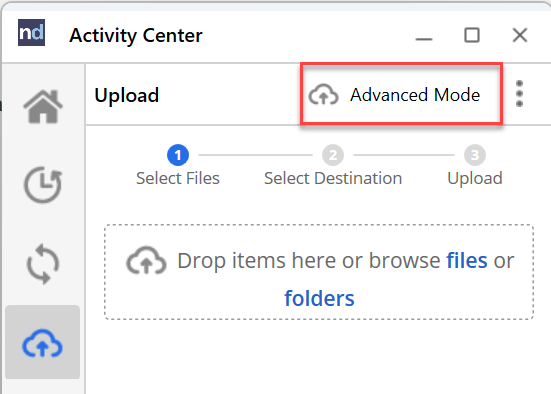
Step 3: Click on Advanced Mode
Step 4: Click New

Step 5: Start an Upload
Step 6: Click New and Start another Upload
Limitations to Be Aware Of
While Advanced Mode is powerful, the ndOffice Folder Import Tool does have some technical limitations you should consider:
File and Folder Limits
- Individual file size: 50GB per File
- Document count: Up to 30,000 documents per import batch
- Number of subfolders: Maximum of 500 subfolders within an import
- Items per folder: Maximum of 1,000 items per individual folder
- Path length: File paths exceeding 256 characters cannot be uploaded
Path Length Example
This file path would fail to import because it exceeds 256 characters:
C:\Users\Optiable\Desktop\Demo Documents\Docs Production of 9-2-2024\Docs\Docs Production of 8-8-2022\Docs\Docs Production of 8-8-2022\Docs\Docs Production of 8-8-2022\Agreement\2014 January Registration Information via Town Green Special Services District.pdfWorking Around Limitations
If you encounter these limitations, consider using these tools:
- Folder Axe: Split large folder structures into smaller, manageable batches
- Ron’s Renamer: Bulk rename files and shorten path lengths
Conclusion
Advanced Mode in ndOffice 4.1’s Folder Import Tool represents a significant productivity enhancement for NetDocuments users. By enabling multiple simultaneous imports, it streamlines document migration and bulk upload processes, saving valuable time for legal professionals and document managers.
While there are some technical limitations regarding file sizes, document counts, and path lengths, these constraints are generally manageable with proper planning and the use of supplementary tools when needed.
If you haven’t yet upgraded to ndOffice 4.1 or later, now is an excellent time to take advantage of this powerful feature and transform your document management workflow.