

The Secret to using NetDocuments on a Mac Part 3: Gmail Integration

Gmail Integration no longer works like this.  We will be posting an updated article soon.

ND-MAC

NetDocuments has pretty good integration with Gmail. This is the perfect solution for anyone using a Mac because it gets around the fact that NetDocuments does not have an integration with Outlook.

You can get it here: https://chrome.google.com/webstore/detail/ndgmail-beta/kpkmhkfobogeihaichdnhhkmaeeihacf?hl=en-US

Once you have it installed, you will get a Save to nd button in your Gmail account.  This will only work in Google Chrome, so if you open up your Gmail in Internet Explorer,  the Save to ND will not be there.

image

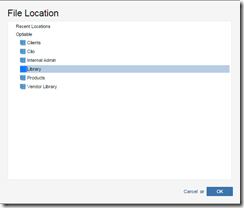
When you click on Save to nd, you can then browse your cabinets and choose the correct location to save your email.
image

About the Author

Craig Bayer is the founder and leader of Optiable, an award-winning document management (DMS) consulting firm dedicated to helping law firms seamlessly integrate NetDocuments. Specializing in firms with 10 to 150 users, he has successfully guided over 500 law firms across the United States and Canada through NetDocuments implementations since 2010.

With deep expertise in the legal industry, Craig has a proven track record of optimizing technology to meet the unique needs of law firms. His certifications include industry-leading tools such as Amicus Attorney, Centerbase, Clio, PCLaw, HotDocs, TimeMatters, Soluno, and Worldox, enabling him to deliver comprehensive solutions tailored to each client’s workflow and goals.

Craig Bayer