

If you’re a lawyer or legal professional, your calendar is sacred territory. Every appointment, court date, and client meeting needs to be precisely scheduled and easily accessible. The last thing you need is spam calendar invites cluttering your schedule with bogus meetings for cryptocurrency schemes, fake webinars, or phishing attempts.
Unfortunately, spam calendar invites have become an increasingly common problem for legal professionals. These unwanted invitations automatically populate your Outlook calendar, creating confusion and potentially causing you to miss legitimate appointments among the clutter.
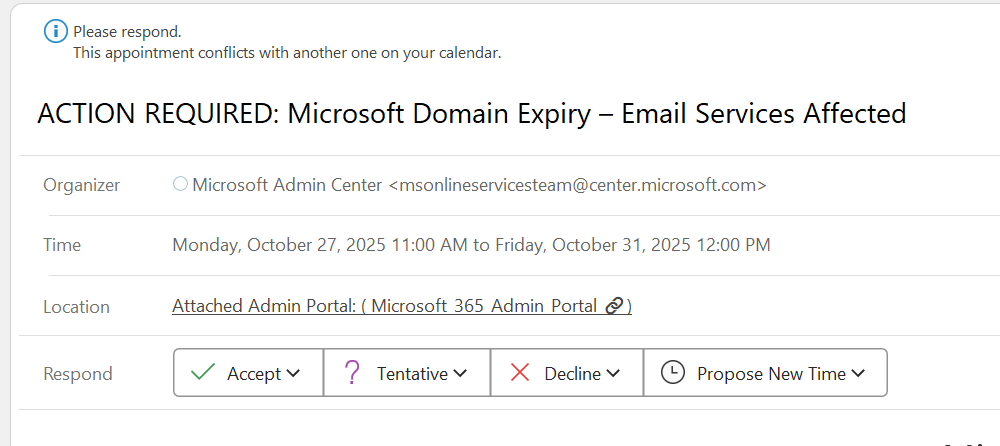
The good news? You can stop these spam invites from automatically appearing in your calendar with a few simple settings changes.
Why Lawyers Are Prime Targets
Legal professionals are particularly vulnerable to spam calendar invites for several reasons. Law firms typically publish attorney email addresses on their websites and in legal directories, making them easy targets for spammers. Additionally, lawyers frequently interact with external parties, clients, and opposing counsel, which means they can’t simply block all external calendar invites without disrupting legitimate business.
The Root of the Problem
By default, Outlook automatically adds meeting invitations to your calendar as “tentative” appointments. While this feature is designed for convenience, it becomes a liability when spammers exploit it. These malicious actors send calendar invites knowing they’ll appear on your schedule automatically, even if you never open the email.
Solution 1: Prevent Automatic Calendar Additions
The most effective way to stop spam calendar invites is to change how Outlook processes meeting requests.
For Outlook Desktop (Microsoft 365):
Step 1: Open Outlook and click File in the top menu
Step 2: Select Options
Step 3: Click Calendar in the left sidebar
Step 4: Under “Calendar options,” find the “Automatically add meeting invitations to my calendar” setting
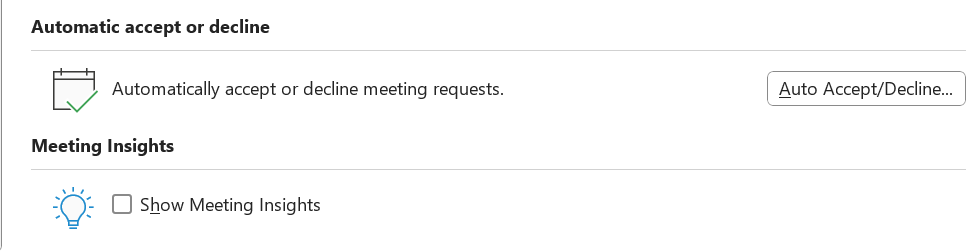
Step 5: Change this from “Automatically accept or decline meeting requests” to “Automatically add meeting invitations to calendar and optionally decline requests” or better yet, uncheck “Automatically accept meeting requests and remove canceled meetings”
Step 6: Uncheck “Automatically process meeting requests and responses”

Step 7: Click OK to save your changes
With these settings disabled, meeting invitations will arrive in your inbox as emails rather than automatically populating your calendar. You can then review each invitation and manually add legitimate meetings to your schedule.
Best Practices for Legal Professionals
Beyond technical solutions, adopt these habits to minimize spam calendar invites:
Never click links in suspicious calendar invites. Spammers use these to confirm your email is active or to launch phishing attacks. Simply delete the invitation.
Report spam calendar invites. Use Outlook’s “Report Phishing” or “Report Junk” features to help Microsoft improve its filtering algorithms.
Be cautious about where you publish your email address. While lawyers need public visibility, consider using a contact form on your website instead of displaying email addresses directly.
Educate your staff. Ensure paralegals, assistants, and associates know how to identify and handle spam calendar invites properly.
Review your calendar regularly. Set aside time weekly to review your calendar and remove any spam invites that slipped through.
What to Do If a Spam Invite Is Already on Your Calendar
If spam invites have already populated your calendar:
- Don’t click “Accept,” “Decline,” or “Tentative” – this confirms to the spammer that your email is active
- Simply delete the calendar entry from your calendar view
- Delete the original email from your inbox or junk folder
- Add the sender to your blocked list
The Bottom Line
For lawyers and legal professionals, calendar management is critical to practice management. Spam calendar invites are more than just an annoyance – they’re a security risk and a productivity drain that can interfere with your ability to serve clients effectively.
By disabling automatic calendar additions in Outlook and implementing the additional safeguards outlined above, you can reclaim control of your schedule and ensure that only legitimate meetings appear on your calendar.
Your time is valuable, and your calendar should reflect only the appointments that matter to your practice and your clients. Take a few minutes today to implement these changes, and you’ll save hours of frustration down the road.
Have questions about managing your law firm’s technology? Concerned about cybersecurity threats targeting legal professionals? Contact your IT department or managed service provider for additional guidance tailored to your firm’s specific needs.