

Fixing issues with the NetDocuments Clio Integration

Posted in NetDocuments Integrations, NetDocuments Tips on February 23, 2021 by Craig Bayer

Years ago Clio built an integration with NetDocuments.  The main purpose is to push clients and matters created in Clio to NetDocuments. 

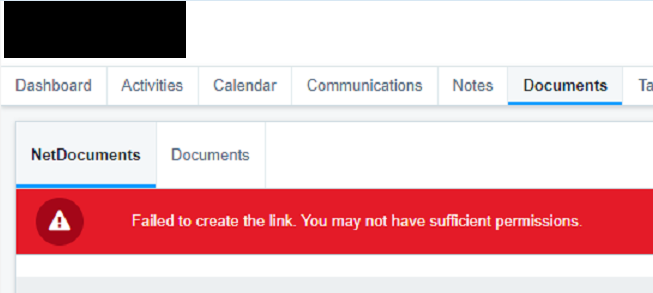
Recently I turned it on at a firm and was running into this error message.

Failed to create the Link.  You may not have sufficient permissions. 
image

Finally with the help of NetDocuments Support, I was able to fix this.

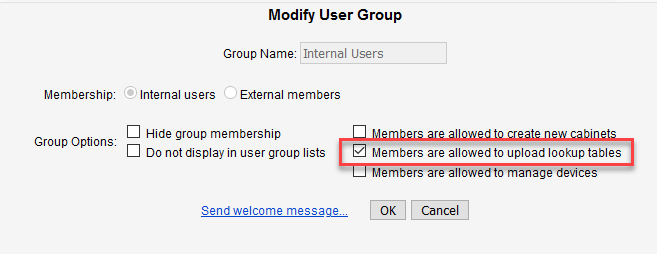
In NetDocuments, Go to Admin –> Users and Groups.

Open up the Internal Users Group
image

Check the Box next to Members are allowed to upload lookup tables.  This will allow any users to create new client and matter profile attributes. 

About the Author

Craig Bayer is the founder and leader of Optiable, an award-winning document management (DMS) consulting firm dedicated to helping law firms seamlessly integrate NetDocuments. Specializing in firms with 10 to 150 users, he has successfully guided over 500 law firms across the United States and Canada through NetDocuments implementations since 2010.

With deep expertise in the legal industry, Craig has a proven track record of optimizing technology to meet the unique needs of law firms. His certifications include industry-leading tools such as Amicus Attorney, Centerbase, Clio, PCLaw, HotDocs, TimeMatters, Soluno, and Worldox, enabling him to deliver comprehensive solutions tailored to each client’s workflow and goals.

Craig Bayer