

Desktop ScanSnap Scanners have been the darling of the legal community for years. When I first started working with NetDocuments over ten years ago, we would use the AutoImport Feature to get scanned documents into NetDocuments. Finally, we worked with ScanSnap to create a direct integration with NetDocuments. Now that Scansnap has been sold, the integration is being actively supported. If the official integration doesn’t work, please use this method to scan directly into Adobe and then save the document to NetDocuments.
Step 1: Right-click on the ScanSnap Button in the system tray
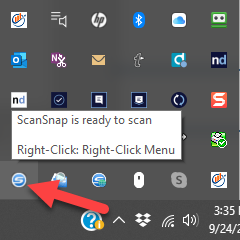
Step 2: Click on Scan Button Settings…

Step 3: Uncheck ‘Use Quick Menu’ and select your PDF Program.
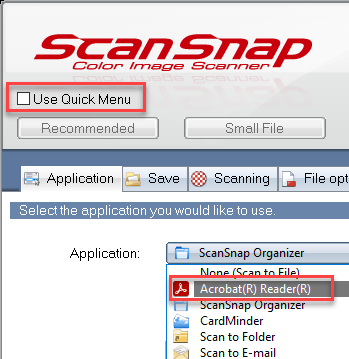
Step 4: In the PDF Program, click Save, and NetDocuments should pop open.

If you need help configuring your PDF Program with NetDocuments, check out this article.