

You’ve seen it before, or you will. A new attorney starts on Monday. Your admin creates the account, sends the welcome email, and the attorney sits down to log in.
Instead of NetDocuments, they get this:
80030005 Non Interactive Service Account
No explanation. No “contact your administrator.” Just a code that looks like something out of a Windows crash log.
Search that number, and you’ll find almost nothing. So let me save you the support ticket.
What the Error Actually Means
The account exists. The password is right. Nothing is broken.
Somebody flipped a switch on that user’s profile that marked it as a non-interactive service account. That setting does exactly what its name says: it tells NetDocuments this account is never supposed to be used by a human sitting at a keyboard. So when a human sits at a keyboard and tries to use it, NetDocuments refuses.
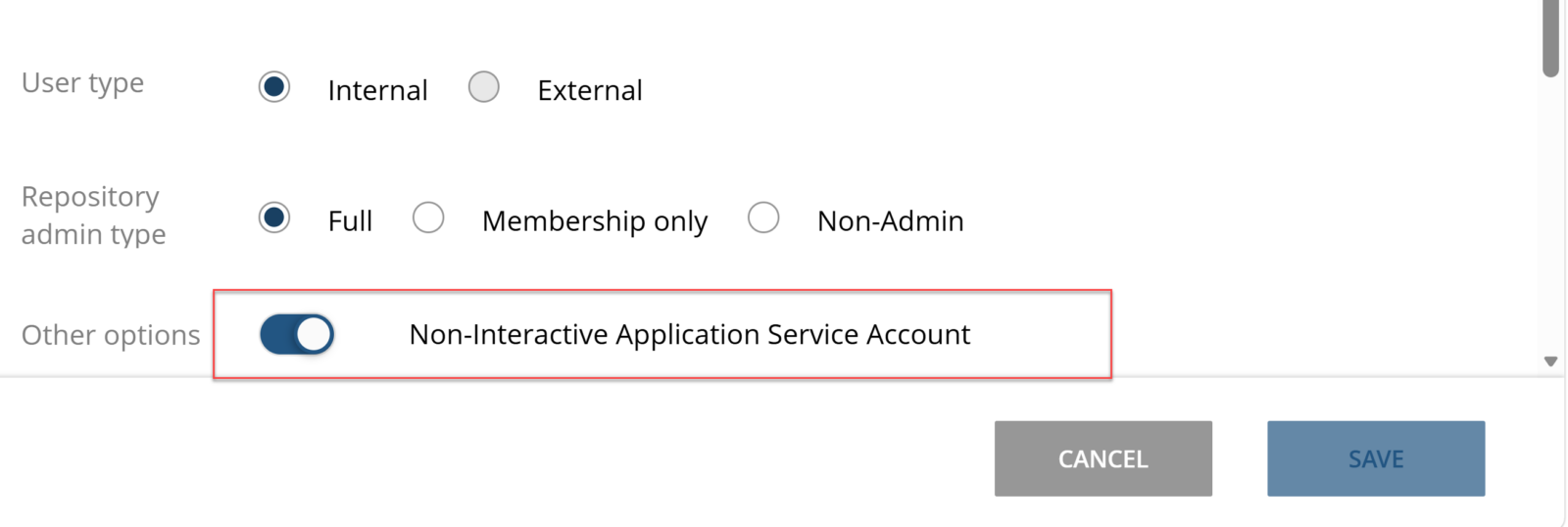
That’s the whole story. It’s not a permissions problem, an SSO problem, or a browser problem. It’s a one-checkbox problem.
Why Non-Interactive Service Accounts Exist
Here’s the part that matters for your budget: a non-interactive service account doesn’t consume a NetDocuments license.
That’s the entire point of the feature. Plenty of things need to authenticate to your repository that aren’t people:
- Pattern Builder workflows – automations that create documents, apply metadata, and move things around need an identity to act as.
- Third-party integrations – e-signature platforms, litigation support tools, AI review tools, backup and migration utilities. Most of them want a dedicated NetDocuments account.
- Scripted or scheduled processes – anything that runs on a timer and touches documents.
If every one of those had to burn a paid license, integrations would get expensive fast. So NetDocuments gives you accounts that can hold credentials and act inside the repository, but can’t sit down at a browser and log in like a person.
Free to create. Can’t log in. Those two facts are the same fact.
| Interactive user | Non-interactive service account | |
|---|---|---|
| Consumes a license | Yes | No |
| Can log into the NetDocuments web UI | Yes | No |
| Can authenticate for API and integrations | Yes | Yes |
| Intended for | People | Software |
How to Fix It
The fix takes about thirty seconds, and it has to be done by someone with repository administration rights.
- Open your NetDocuments repository administration and go to the user list.
- Find the user and open their profile.
- Turn off the non-interactive service account setting.
- Save, then have the user try again. They may need to close the browser tab first.
Then check your license count. Because you just consumed a license that you weren’t consuming a minute ago. If you’re at your ceiling, that’s a conversation with your NetDocuments rep or your reseller, not a setting you can toggle your way out of.
That order matters. Fix the account first, then deal with licensing. Don’t leave an attorney locked out while you sort out procurement.
The Bottom Line
Error 80030005 isn’t a bug and it isn’t a mystery. It’s NetDocuments telling you that the account someone is trying to log in with was explicitly marked as software, not a person.
Uncheck the setting, watch your license count, and move on.
And while you’re in there, look at how your integrations authenticate. If any of them are running on a real attorney’s credentials, fix that before that attorney gives notice.
Optiable has implemented NetDocuments at over 550 law firms since 2010, working with firms from 10 to 150 users. If you’re troubleshooting user administration, licensing, or Pattern Builder setup, schedule a free consultation at go.oncehub.com/optconsult or call us at 1-800-399-0852.