

When running a Conflicts of Interest search in PracticeMaster, most firms don’t realize they can extend that search directly into NetDocuments — surfacing document-level results alongside their matter and contact records. Here’s how to make sure that option is available to your users.
The Setup: One Key Setting in User Options
The ability to include NetDocuments as a conflicts search source is controlled by a single user-level setting. Before walking through it, this assumes that your firm’s NetDocuments integration has already been enabled at the firm level in PracticeMaster.
To configure it, go to Maintenance > Integrations > NetDocuments. From there, navigate to User Access and look for User Options. Check the box for “View the document contents in NetDocuments when opening up from PracticeMaster.”
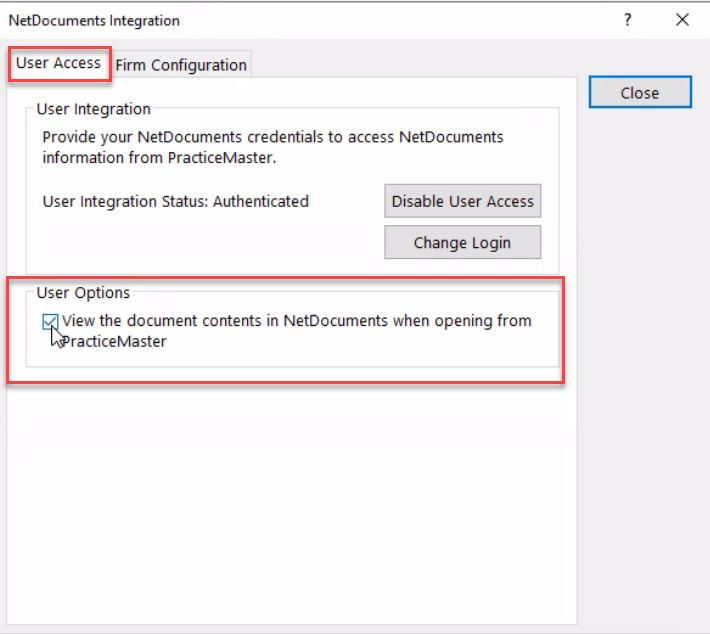
That’s the key setting. Once it’s enabled, the behavior automatically carries over to the conflicts workflow.
What This Unlocks in Conflicts of Interest Search
Once that option is checked, when a user runs a Conflicts of Interest search in PracticeMaster, they’ll now see a NetDocuments source checkbox available in the search interface. Selecting it tells PracticeMaster to include NetDocuments in the search — and it runs an “everything” search in NetDocuments against whatever name or term you’re searching for.
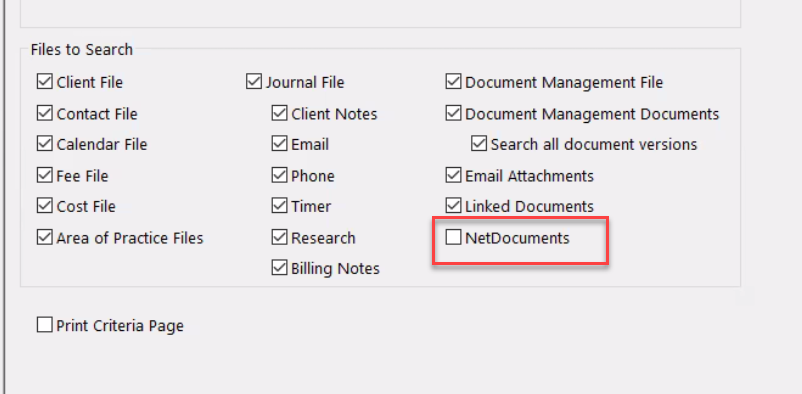
This means the conflicts search isn’t limited to just the data inside PracticeMaster. It reaches into your actual document repository and looks across document content and metadata, giving your staff a much more complete picture before a new matter is opened.
Why This Matters
A conflicts check that only searches your practice management database can miss prior relationships that exist only in documents — old engagement letters, correspondence with an adverse party, or a company name buried in a contract. Including NetDocuments as a source closes that gap without requiring staff to run a separate NetDocuments search manually.
It’s a simple configuration step, but many firms skip it because they don’t know it’s there.