

How to Use NetDocuments with Kofax Power PDF Advanced

Posted in NetDocuments and PDF Software, NetDocuments Tips on October 31, 2024 by Craig Bayer

A couple of years ago, we did a webinar comparing the different PDF Programs and how they integrated with NetDocuments.  Our conclusion was that Adobe was the best, because it had the most integrations with NetDocuments.  In all the PDF programs, when you go to open or save a pdf, NetDocuments Pops.  The bigger issue is when you go to do the following:

  • Insert Pages
  • Combine Files
  • Bates Numbering

Adobe used to the the only program that would pop when using all three of those features, however, Kofax will now do this as well.

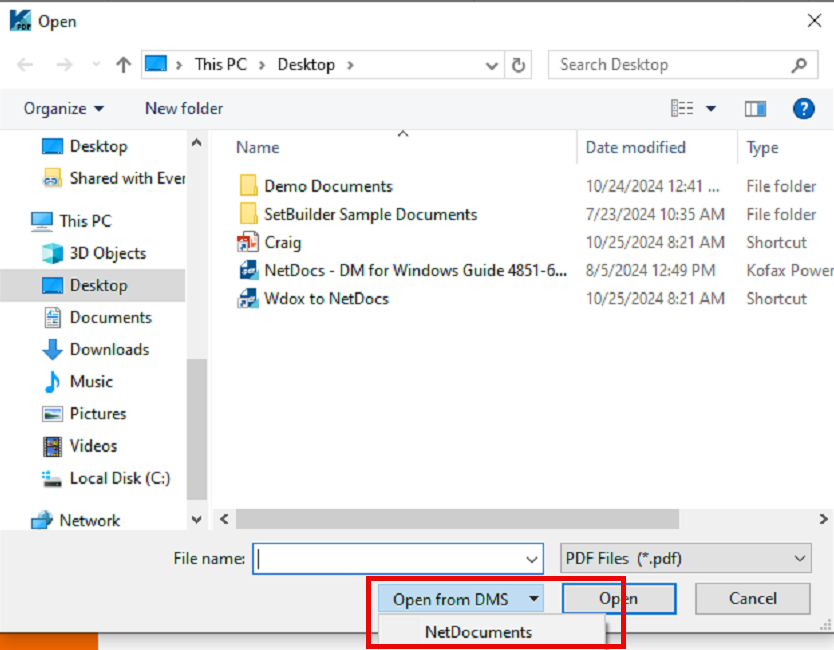
When you Windows Explorer button opens up, Click Open from DMS.  This will pop open NetDocuments.
image

This feature also works with Insert, Combine Files and Bates Numbering.  This really gives Kofax Power PDF Advanced the same functionality as Adobe with regards to the NetDocuments Integration.

How to Connect Kofax Power PDF Advanced with NetDocuments


About the Author

Craig Bayer is the founder and leader of Optiable, an award-winning document management (DMS) consulting firm dedicated to helping law firms seamlessly integrate NetDocuments. Specializing in firms with 10 to 150 users, he has successfully guided over 500 law firms across the United States and Canada through NetDocuments implementations since 2010.

With deep expertise in the legal industry, Craig has a proven track record of optimizing technology to meet the unique needs of law firms. His certifications include industry-leading tools such as Amicus Attorney, Centerbase, Clio, PCLaw, HotDocs, TimeMatters, Soluno, and Worldox, enabling him to deliver comprehensive solutions tailored to each client’s workflow and goals.

Craig Bayer